Choose what you need to do
Your Dashboard is the starting point for every auction. It shows current, ended and archived auctions, along with the next recommended action for anything that needs attention.
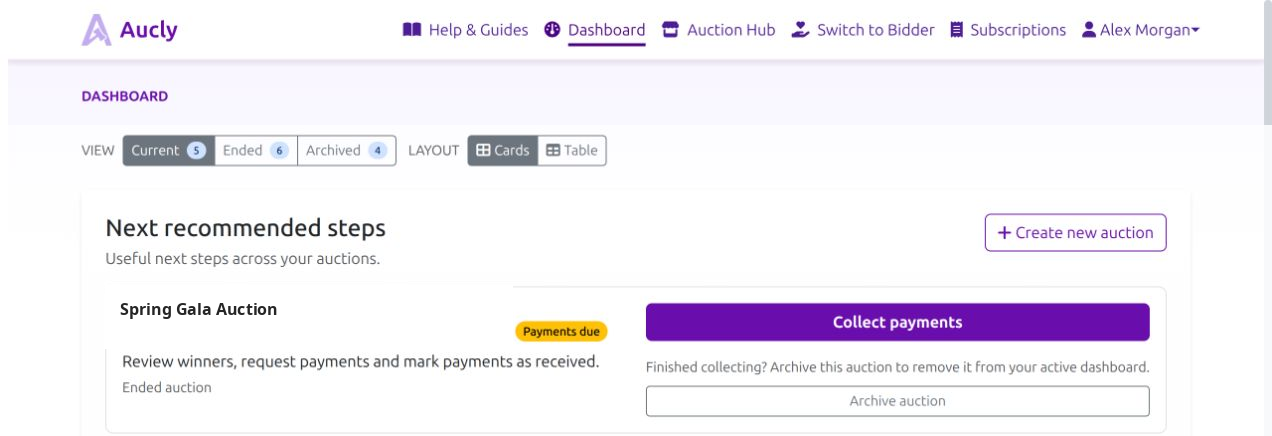
- Create your first draft if you are new to Aucly.
- Add or update auction items while you are preparing the prizes.
- Schedule and launch the auction when its details and items are ready.
- Promote the auction once you have a link to share.
- Collect payments and arrange handover after bidding ends.
Follow the auction journey
An auction starts as a draft without a bidding window. You add its details and items, then schedule when bidding will open and close. It becomes live at the scheduled start time and ended after the closing time. When winner follow-up is complete, you can archive it from the active dashboard.
The Schedule and launch guide explains these states and the checks required before bidders can see an auction.
Find a specialist guide
- Create and edit auctions: details, currency, appearance and duplication.
- Event Display: configure the shared-screen appearance and present an auction at an in-person event.
- Reserve pricing: private minimum prices and possible outcomes.
- Organisation settings: public organisation details, defaults and contact information.
- Stripe card payments: connect Stripe and understand Stripe payment links.
- Email templates: customise bidder and winner messages.
- AI-generated descriptions: draft auction and item copy to review and refine.
If your account is also a bidder account, use Switch to Bidder or Switch to Organiser in the navigation. This changes the available menus and actions; it does not create another account.
Your next step
For a new auction, follow Getting started. If you already have a draft, open it from the Dashboard and continue with its next recommended action.