Choose the email you want to change
Open Organisation settings, then choose Email templates. Search or browse the two auction notifications and four payment-collection templates:
- Outbid notification
- Auction ending-soon reminder
- Payment request
- Payment received thank-you
- Payment request (multiple items)
- Payment received thank-you (multiple items)
Launch announcements and general reminder emails are not editable templates. Account-security and service emails are not edited here either.
The Bidder Email Notifications tab controls whether outbid and auction-ending emails are sent. Email templates controls the wording used when an enabled message is sent.
Choose a template to edit Subject and Message. Customised identifies saved wording; Aucly default means the safe default will be used. Select Reset subject or Reset message if you want to return one part to that default.
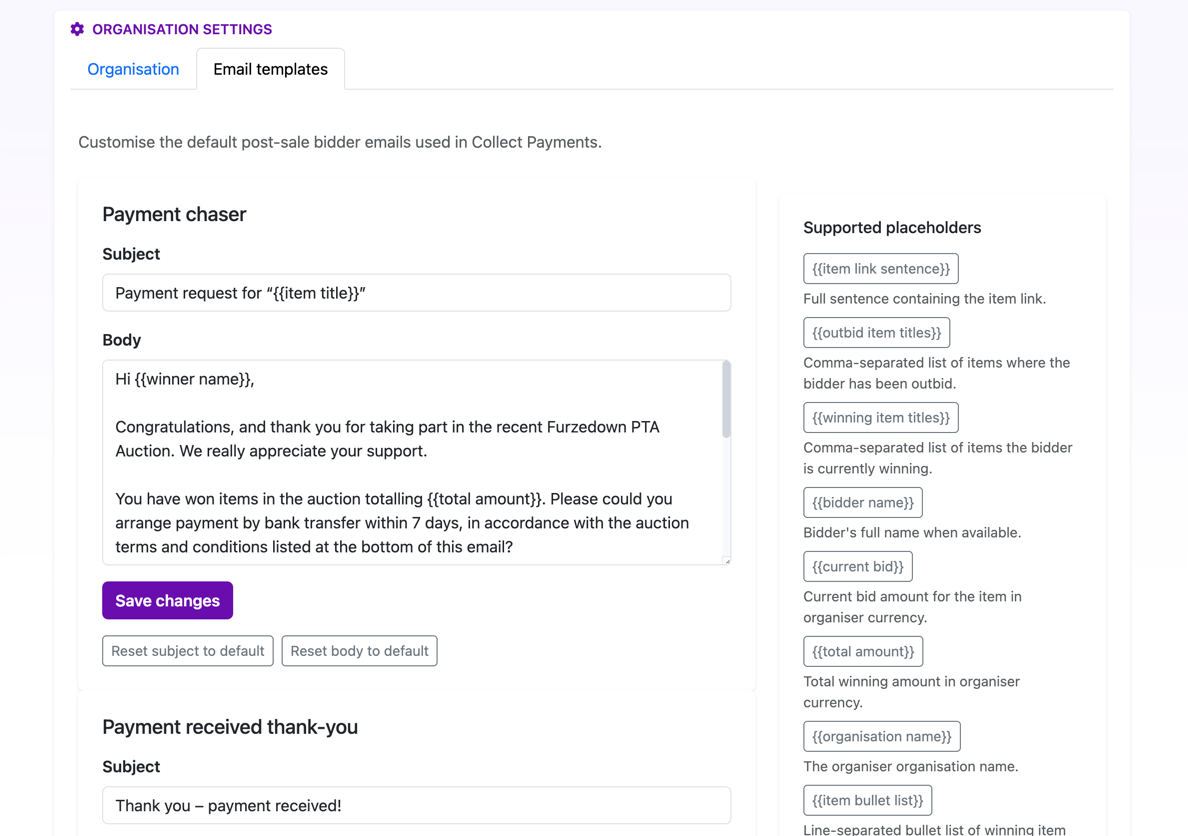
Placeholders belong to a specific template
Open Supported placeholders for the selected email. Click a placeholder to insert it into the subject or message. The available placeholders change with the email's purpose, so each one represents information Aucly can provide when that message is sent.
Payment-request and payment-received emails have separate versions for one item and several items. Use only the placeholders listed for the selected template. The multi-item versions can provide item titles, an item count and the total; auction notifications provide the activity relevant to that message.
Check any warning beneath the subject or message. An unavailable placeholder is removed when Aucly sends the email, so replace it with one from that template's list. The preview uses representative data and does not queue a real message. Select Save changes when the subject, message and preview are right.
Templates used from Collect Payments
The Email template list in Collect Payments offers templates suitable for that single-item or grouped-winner action. You can edit the subject and message for one send without changing the saved template.
External payment requests should include the payment instructions placeholder. If instructions are missing, Collect Payments shows Add payment instructions and prevents the request. Prize-details emails can include selected private fulfilment details and attachments.
Your next step
Start with the message your bidders are most likely to receive, usually Outbid notification or Payment request. Make one small change, check the live preview, then save it. Open Collect Payments after an auction ends to review the final message before it is sent.