Set up in minutes

How to run your fundraising auction with Aucly

Create your auction, share it with your community and manage bidding, winners and payments with tools built for busy organisers.

Set up

Set up & customise your auction

Add your lots, brand your auction page and check every detail before you go live.

  • Add lots by hand, or import a whole catalogue from a spreadsheet with a ZIP of photos.
  • Crop banner images with live desktop and mobile previews.
  • Build and preview for free. Eligible smaller auctions can go live at no cost; choose a paid plan for a higher allowance.
Bid

Let supporters place bids with ease

Share one auction link through newsletters, WhatsApp groups, social media, posters or QR codes. Supporters can take part from any device and follow the auction as it unfolds.

  • Supporters bid from a phone, tablet or computer — no app to download.
  • Proxy bids let supporters set a maximum and let Aucly bid for them.
  • Live bid history and outbid updates keep the competition moving.
Collect

Collect payments your way

See every winner, amount and payment status in one place. Choose bank transfer, or let winners pay by card through your connected Stripe account, and follow each payment through to completion.

  • One dashboard for winners, amounts and delivery details.
  • Direct bank transfer, or optional card payments through Stripe.
  • Track paid, payment submitted and outstanding at a glance.
Community proof

Built from real fundraising-auction experience

Aucly was built after running real PTA and school auctions. The same practical tools now help schools, charities, clubs and other fundraising organisations bring donated prizes, supporters, bids and winner follow-up together in one place.

Straightforward from first lot to final payment

  • Build and preview for free. Eligible smaller auctions can go live at no cost; choose a paid plan for a higher allowance.
  • No Aucly commission on winning bids — Stripe card fees only if you choose card payments.
  • Winners pay by bank transfer, or by card through your optional Stripe connection.
  • Made for PTAs, schools, charities, clubs and other fundraising organisations.
Case study · Furzedown Primary PTA

£2,265 raised from one online auction

Parents and local businesses donated 44 lots, and 63 bidders placed 1,074 bids over the course of the auction.

£2,265
raised
63
bidders
1,074
bids
44
lots
Read the Furzedown PTA case study
Case study · The Lingfield Foundation

£2,500 raised alongside its Golf Day

The Foundation ran an online auction alongside its Golf Day, with bidding open to the wider school community.

Read The Lingfield Foundation case study
Bulk import

A full auction catalogue, without the data entry

Build your lots in a spreadsheet, upload the photos in one ZIP file and let Aucly match them to your lot references. You review every change before anything is imported.

Step 1 · The lots

Import from CSV or Excel

Upload your spreadsheet, confirm how the columns map and review the rows Aucly will add or update.

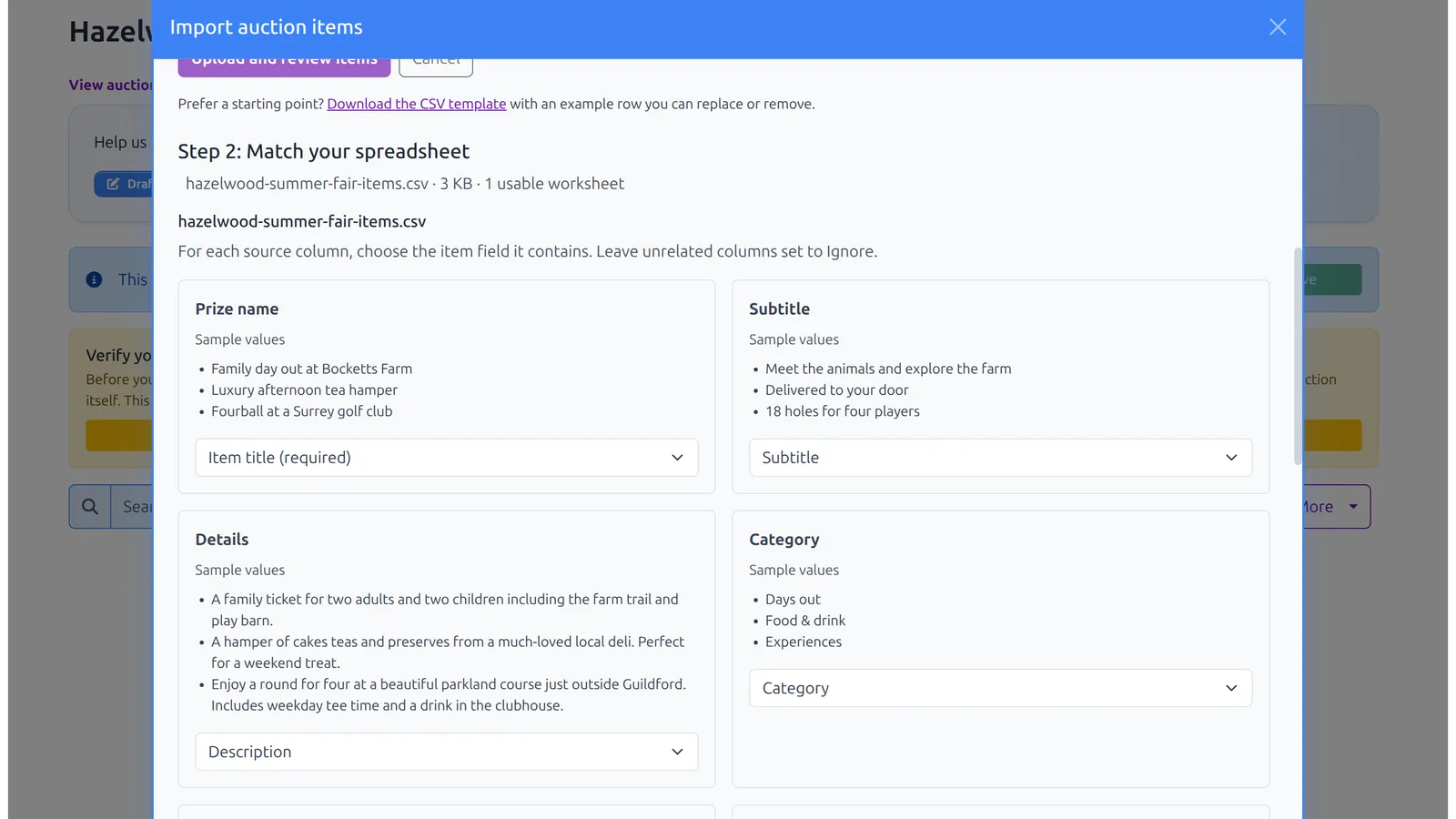
Matching spreadsheet columns to auction item fields in Aucly
Aucly matches headings such as prize name, lot reference and starting bid, then shows a sample from your file.
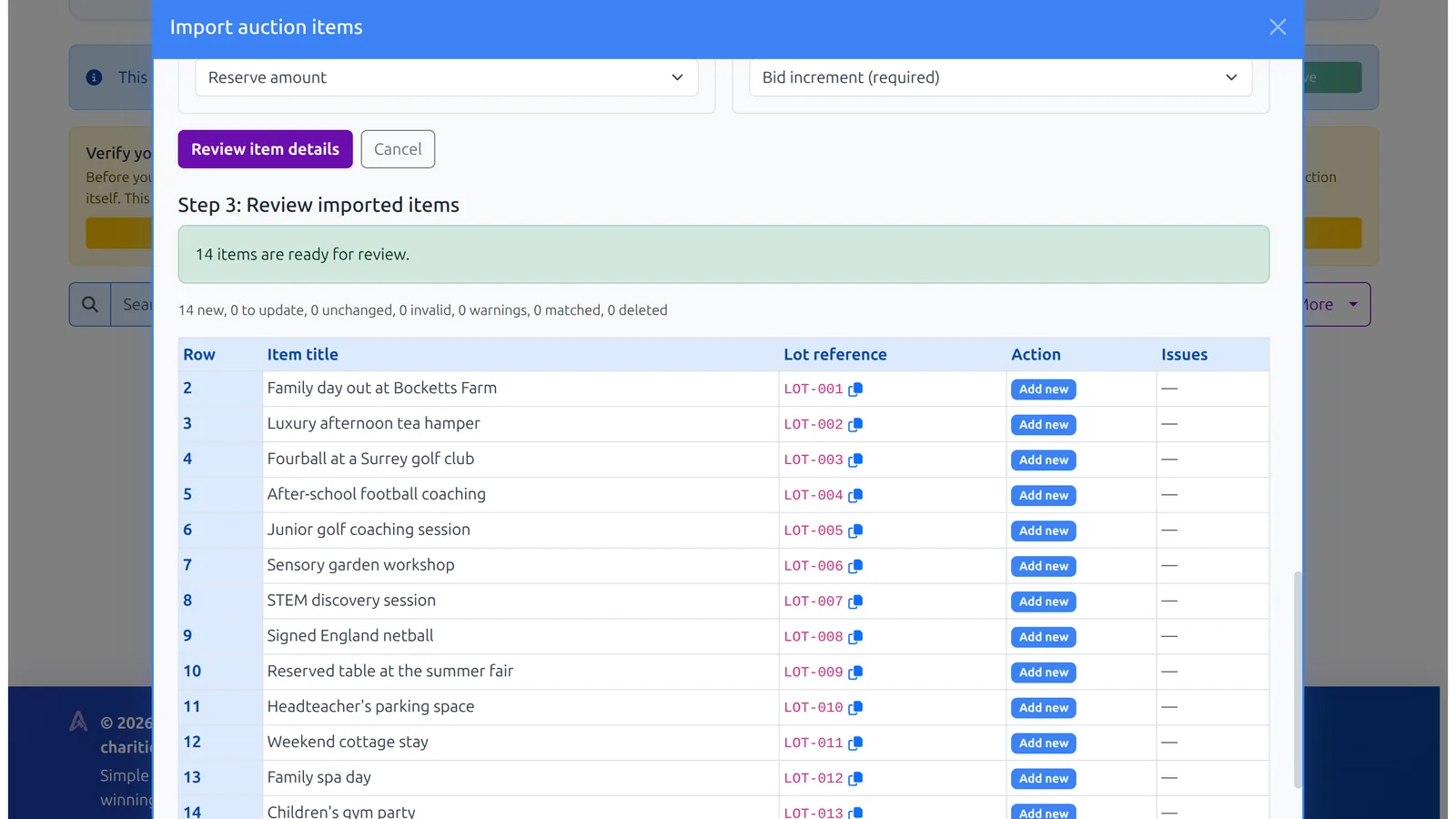
Reviewing fourteen imported auction lots before confirming the import in Aucly
Every row is checked before import. Add new lots or update existing ones without deleting anything you leave out.
Step 2 · The photos

Add lot images from a ZIP

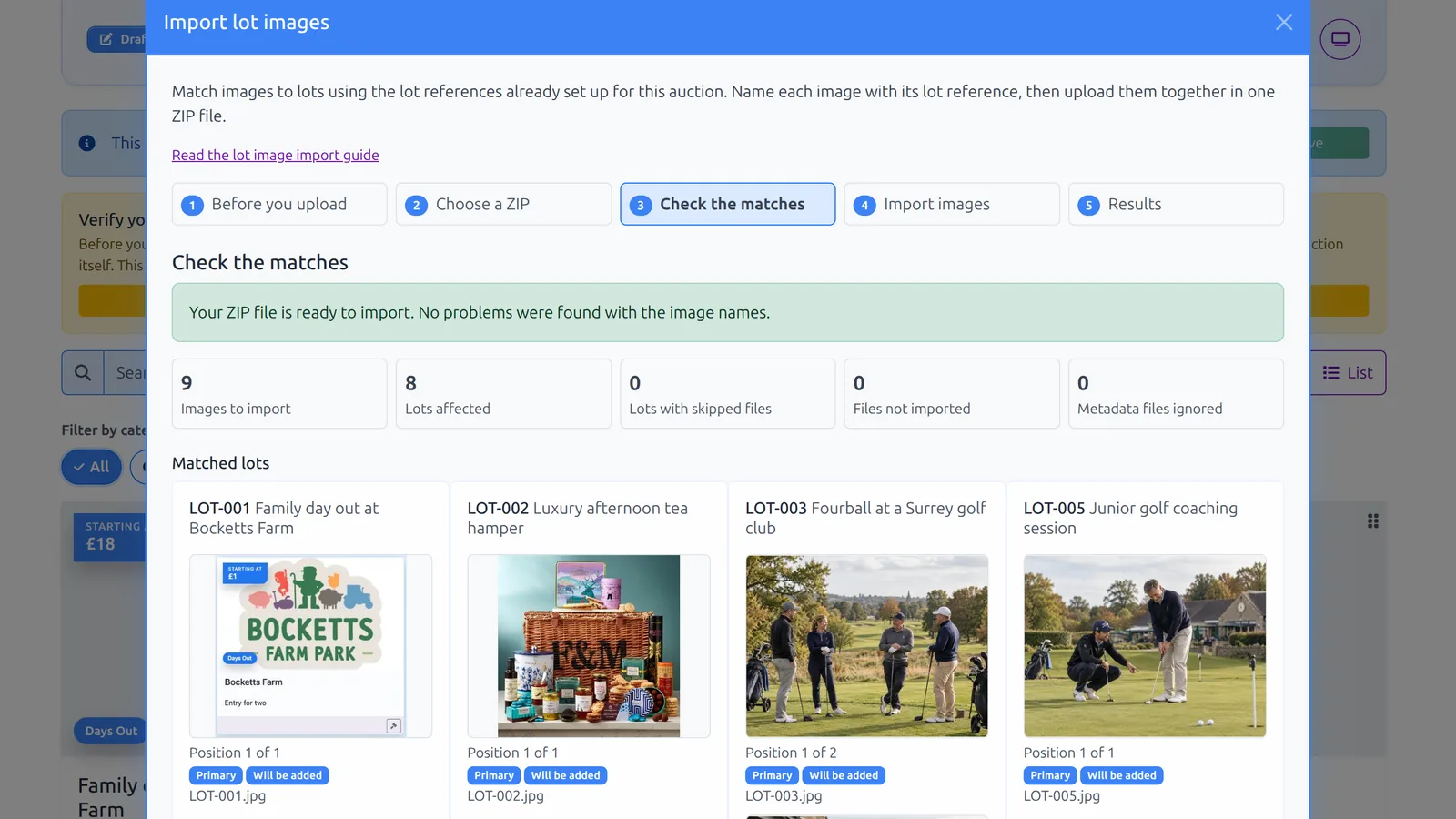
This is a separate import. Name each image with its lot reference and Aucly will match the photos to the lots you have already created.

Checking ZIP image matches against lot references in Aucly
Each photo is matched to its lot reference, with primary and additional images shown before you import.
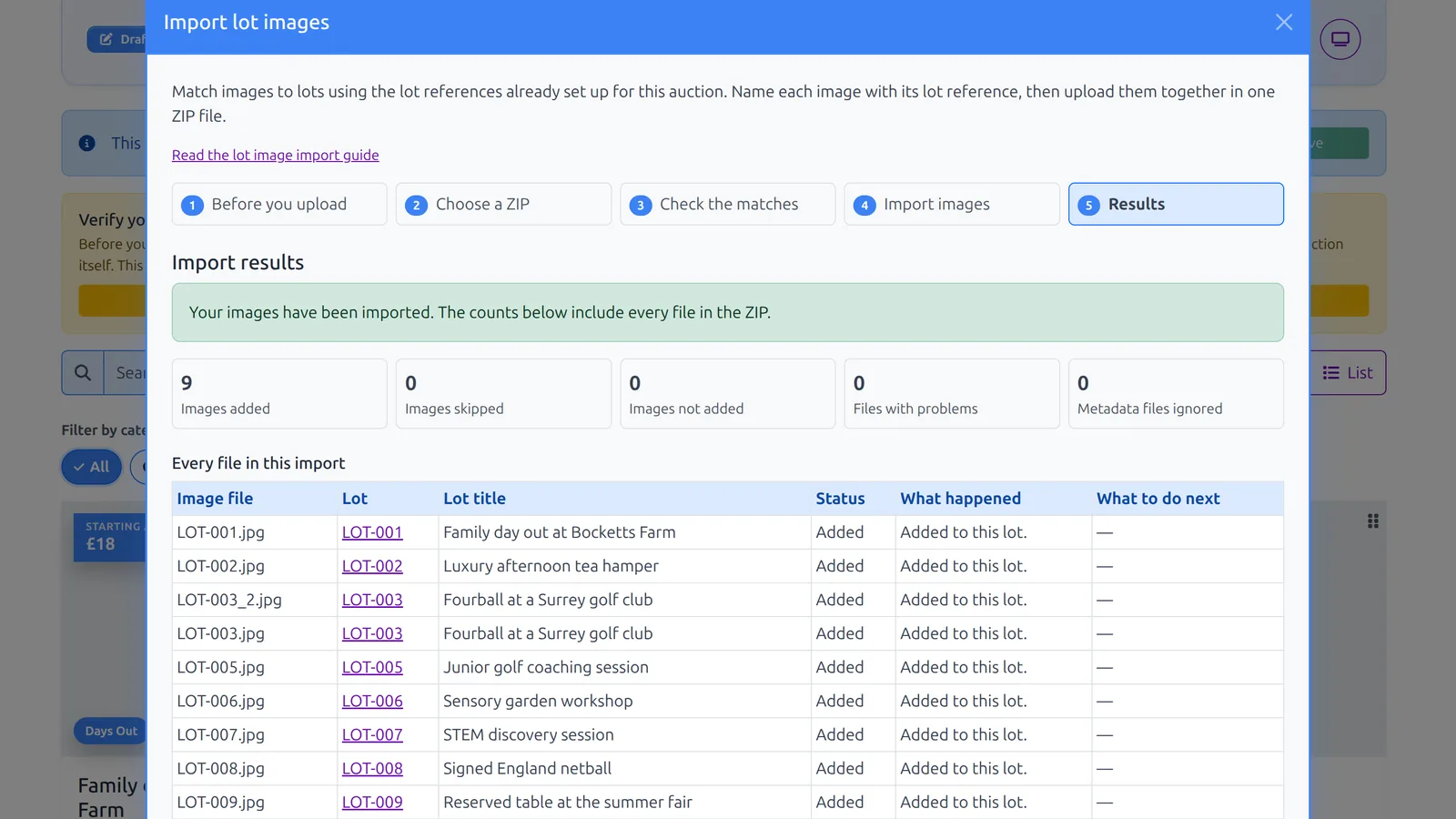
Import results showing nine lot images added to eight auction lots in Aucly
A clear result for every file, so you can confirm what was added and spot anything that needs attention.

Two uploads, one tidy catalogue

The spreadsheet creates the lots; the ZIP adds their photos. Naming an image LOT-003.jpg makes it the first photo, and LOT-003_2.jpg adds a second image to the same lot.

Teamwork

More than one pair of hands

Invite the rest of the committee, share the organiser work, and move between the organisations you help without sharing logins or mixing up auctions.

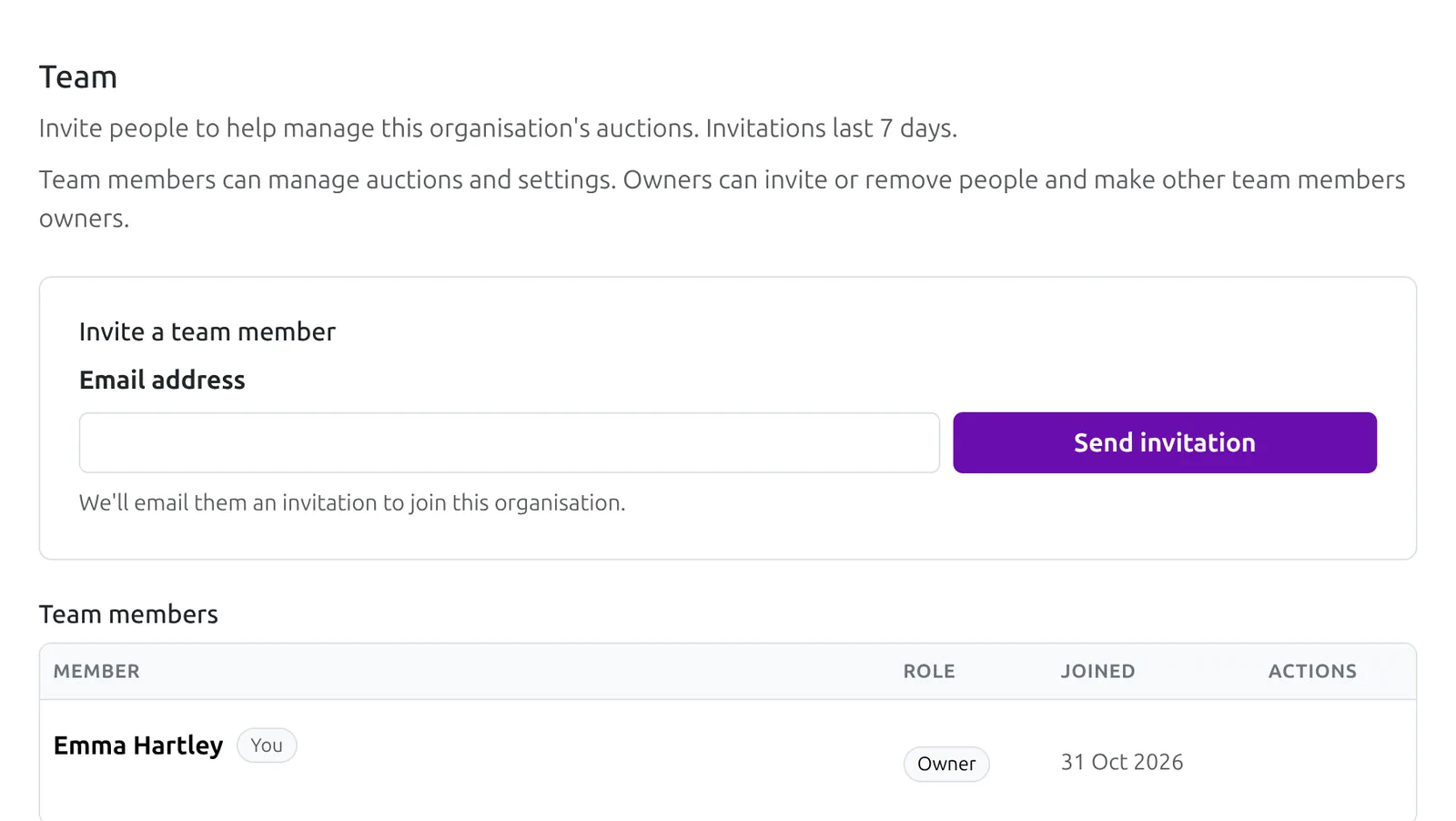
Aucly team settings for Hazelwood Primary School PTA showing the invite form and team member list
Run it together

Invite the committee

Owners can invite team members, resend or revoke invitations, and make other members owners. Team members can manage auctions and settings, so the work does not sit with one person.

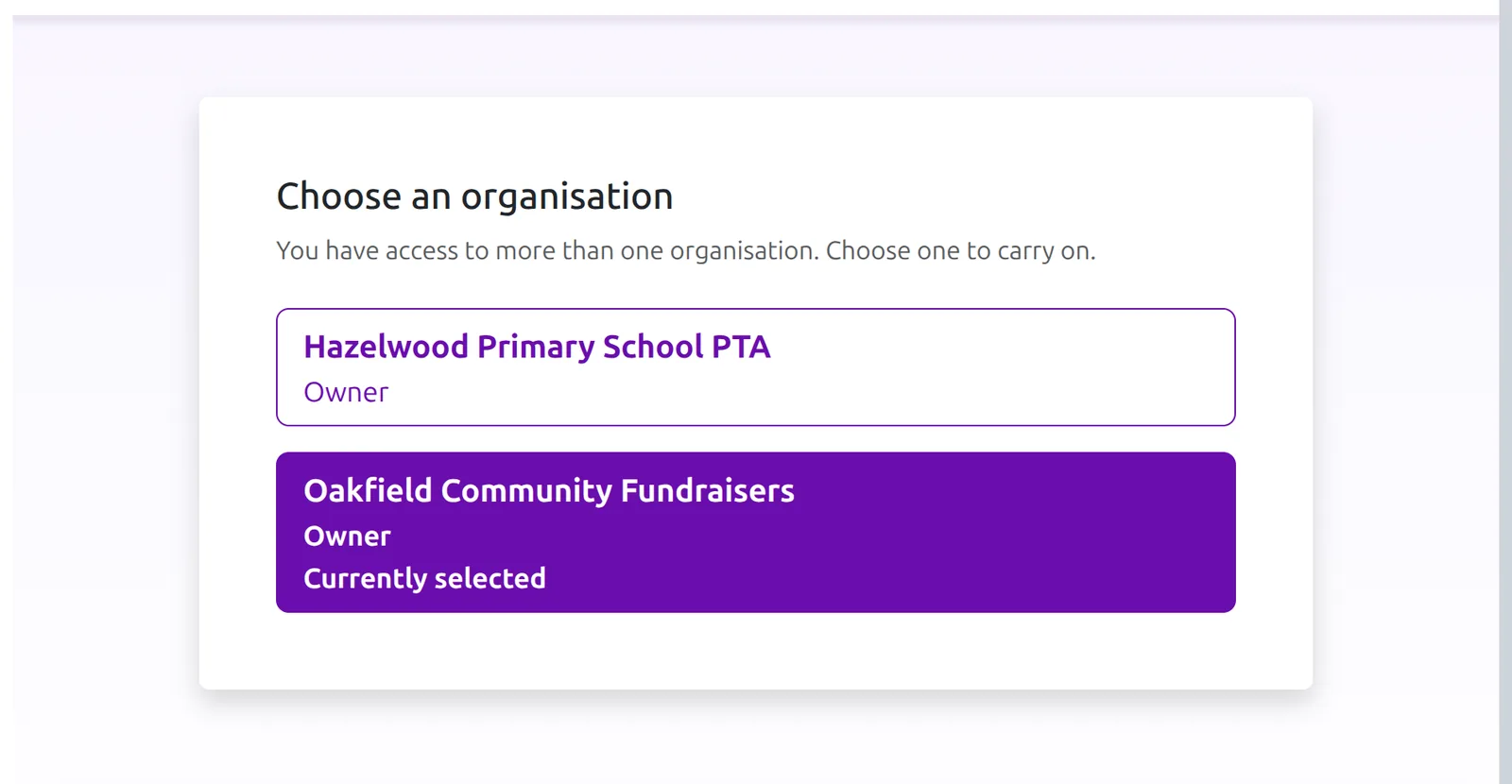
Aucly organisation chooser showing a PTA and a community fundraisers organisation, with the current organisation selected
One account, separate spaces

Switch between organisations

Help more than one PTA, school or charity? Move between organisations from the same account. Each keeps its own settings, auctions, billing and bidder reply-to email, while your sign-in details and bidder history stay with you.

Clear roles, separate organisations

Invitations last seven days, and only owners can invite, remove or promote people. Switching organisations changes the auctions and settings you are working with, not who you are.

Why organisers choose Aucly

Bring auction setup, bidding, winners and payment follow-up together in one place.

Low fees, no platform commission

Keep more of what you raise.

Aucly never takes a percentage of your auction total. If you collect by bank transfer or another offline method, Aucly adds no payment processing fee. If you enable card payments, winners pay securely through Stripe using Stripe's standard card processing fees only.

Familiar bidding

Fun for your supporters.

Familiar online bidding, including automatic proxy bids and last-minute bidding.

Fast setup

Build and publish your auction without a lengthy setup process.

Guided organiser tools help you build and preview before you pay.

Optional card payments

Collect payments your way.

Let winners pay instantly by card using Stripe, or continue collecting payments by bank transfer, donation page, or your existing fundraising setup.

Tools that help you succeed

  • Automatic bid updates, supporter messaging, and downloadable reports.
  • Flexible payment collection with offline options or secure card payments through Stripe.
  • Friendly support from real humans whenever you need a hand.

Ready to start your fundraising auction?

Start building your auction today. Eligible smaller auctions can go live at no cost; choose a paid plan for a higher allowance.