Check the item before you bid
Open the auction link shared by the organiser, then choose an item. Bidding is available only between the auction's start and end times.
Read the description, restrictions and collection or delivery terms. Check these amounts in the auction's currency:
- Starting Price is the opening amount before any bids.
- Current Price is the leading public amount after bidding begins.
- Increment is the step used for competing bids.
Aucly keeps each auction in its chosen currency. Aucly does not convert bid or payment amounts.
Place your bid
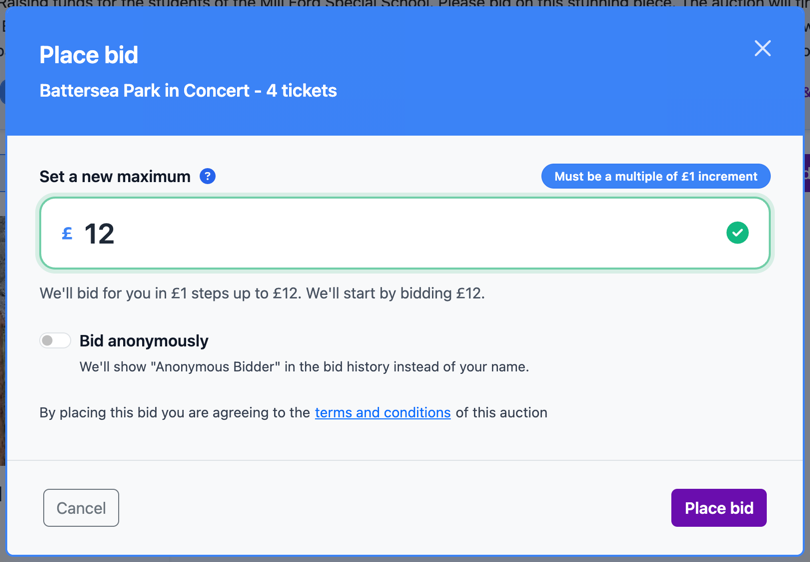
- Select Place Bid on the item. The window is titled Place bid.
- Enter the most you are willing to pay under Set a new maximum. The window shows the minimum accepted amount.
- Select Bid anonymously if you want public bid history to show Anonymous Bidder. Aucly and the organiser can still identify you.
- Read and accept the auction terms, then select Place bid to confirm your commitment to pay if you win.
Your entered amount is a private Max Bid, not necessarily the public price you will pay. Proxy Bidding explains how Aucly uses it and why another maximum can outbid you immediately.
Read the result
If you take the lead, the item shows You're currently winning!, its Current Price and your private Max Bid.
If an existing maximum remains ahead, Aucly says you were immediately outbid and refreshes the minimum in the bid window. Increase your maximum only if you are willing to pay more.
While bidding is open, return to the item and select Modify Bid to set a higher maximum. If your account also has organiser access, select Switch to Bidder before trying to bid.