A silent auction can suit anything from a school fundraiser with a few dozen donated prizes to a charity dinner with hundreds of guests. The bidding is only one part of the work: organisers also need to source and present lots, promote them, settle winners, collect payment and get every prize to the right person.
Online bidding lets supporters browse and bid from a phone, whether they are at home or at a fundraising event. This UK guide covers the whole process, including how an auction can sit alongside a fair, golf day, gala dinner or other live event.
What is an online silent auction?
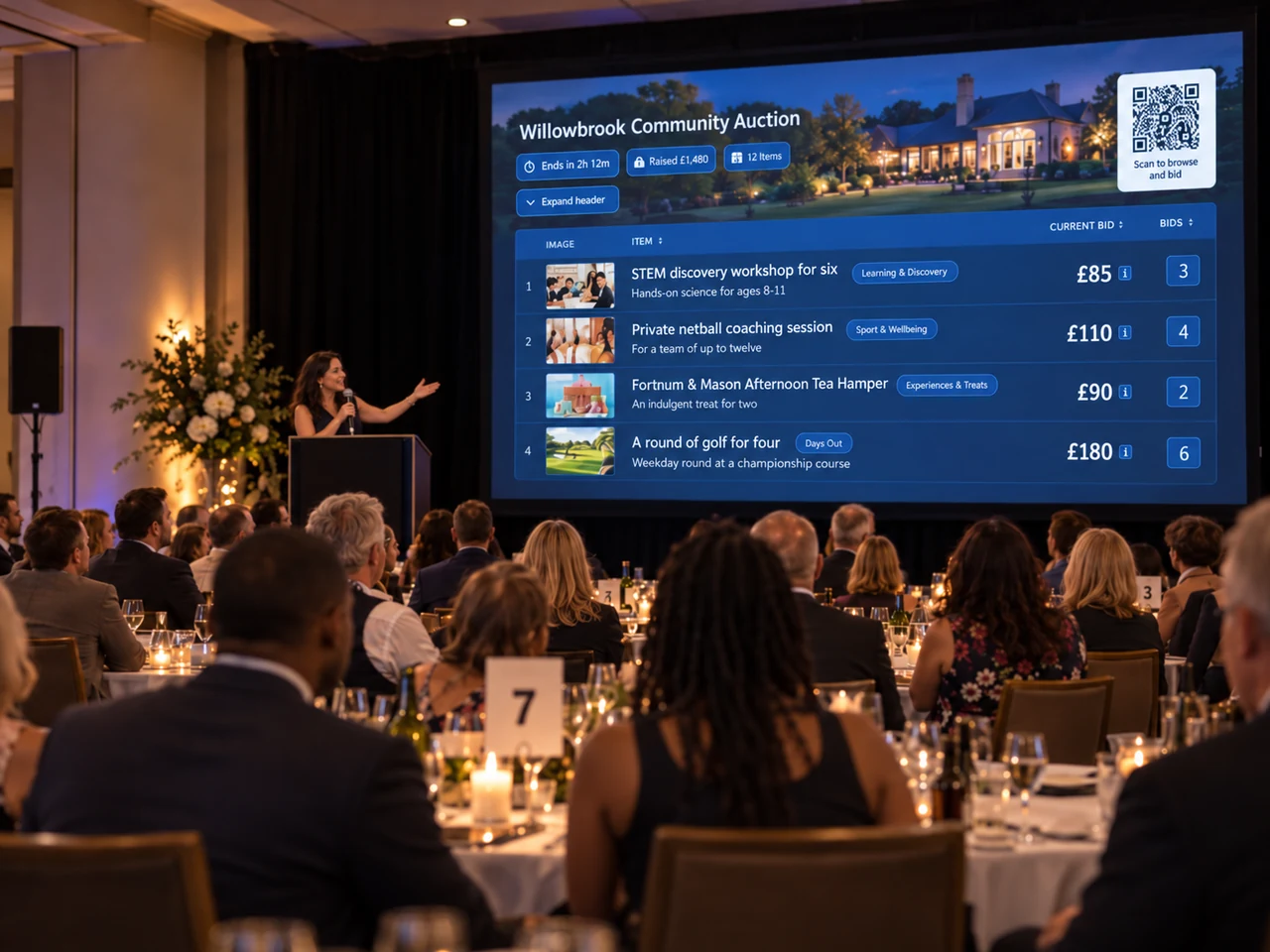
In a traditional silent auction, guests write bids against prizes rather than bidding aloud through an auctioneer. An online silent auction records those bids on a website: bidders can see the current price, place a bid from their phone and return later if someone outbids them.
It might run entirely online for several days, open before an event and close during it, or take place during a gala, school fair or golf day. A fundraiser might also pair silent-auction lots with selected lots sold separately through a live auctioneer. Decide how the formats will work together before inviting bids; do not assume a silent-auction website also records live-auction bids.
Why run the bidding online?
- One clear bid record: you do not need to decipher handwriting or reconcile several paper sheets at closing.
- More ways to take part: supporters can bid remotely as well as at the venue, subject to the auction's rules and access to the internet.
- Time to discover prizes: opening before an event gives guests a chance to browse before they arrive.
- A planned handover: winner, payment and collection follow-up can be considered before the final bid rather than improvised afterwards.
1. Choose a format that fits your fundraiser
Start with the event timetable, the size of your likely audience, the number of lots and the time your volunteers can give. A PTA auction with a handful of prizes and a large charity gala have different needs, but both benefit from a straightforward organiser plan.
- Will bidding be entirely online, or will it be part of a gala, dinner, fair or golf day?
- Will bidding open before the event, and will it close while guests are together?
- Will there also be an auctioneer-led live auction, and how will those winning bids be recorded?
- How many lots and bidders do you expect, and who will manage the auction?
- How will winners pay for and receive their prizes?
2. Find prizes people want to bid on
Build a balanced catalogue with a few headline experiences and accessible items for different budgets. Depending on your supporters, lots might include restaurant or hotel experiences, sports or theatre tickets, artwork, hampers, spa vouchers, lessons, family attractions, school or community experiences, and donations from local businesses.
Record each donation as it arrives: its title, description, estimated value, restrictions and expiry date, donor details, images, and collection or delivery arrangements. Ask donors to confirm the practical conditions early. For a golf round, for example, clarify the number of players, eligible days, booking process and whether a buggy or food is included.
If you have many lots, consistent records and an import process can save time. Keep donor contact details private unless the donor has agreed to be publicly acknowledged.
3. Make every lot easy to understand
Do not simply paste a donor's message into the listing. Give each lot a concise title, a clear description, a good image, the important conditions and a sensible opening price. Set a bidding increment that is easy to follow; use a reserve only when there is a genuine minimum sale price.
State what is included, how long a voucher is valid, any booking restrictions, and whether the winner must collect, arrange delivery or contact the donor. For a larger catalogue, use a consistent naming and image style so that people can browse it easily.

4. Choose software for the whole workflow
Compare more than the bidding screen. Depending on your event, useful capabilities may include mobile-friendly listings, proxy or maximum bids, automatic bid increments, reserve prices, bidder notifications, bulk lot creation, promotion materials, winner management, payment collection and fulfilment tracking.
For larger catalogues, see how the bulk lot and image import workflow handles spreadsheet lot details and a separate ZIP upload for photos.
Some fundraising platforms combine auctions with donations, ticketing, memberships and CRM tools; others focus on auctions. Neither approach is right for every organisation. If the auction is the main task, specialist fundraising-auction software may give organisers the tools they need without asking them to adopt a broader fundraising system. Aucly is designed around the auction workflow, rather than as a full charity CRM or donations platform.
5. Set clear bidding rules and dates
Decide the opening and closing times, starting bids, increments, any reserves and whether bidders can enter a maximum (proxy) bid. Explain how proxy bidding works in plain language: a bidder sets their limit, and the system places bids for them up to that amount according to the auction rules.
A standalone online auction might run for several days. For an event auction, bidding could open in advance and continue through part of the programme. Choose a closing time when your audience can act, repeat it in every message and make the final minutes easy to understand. Keep any live-auction process distinct from the online silent-auction record.
6. Promote individual prizes
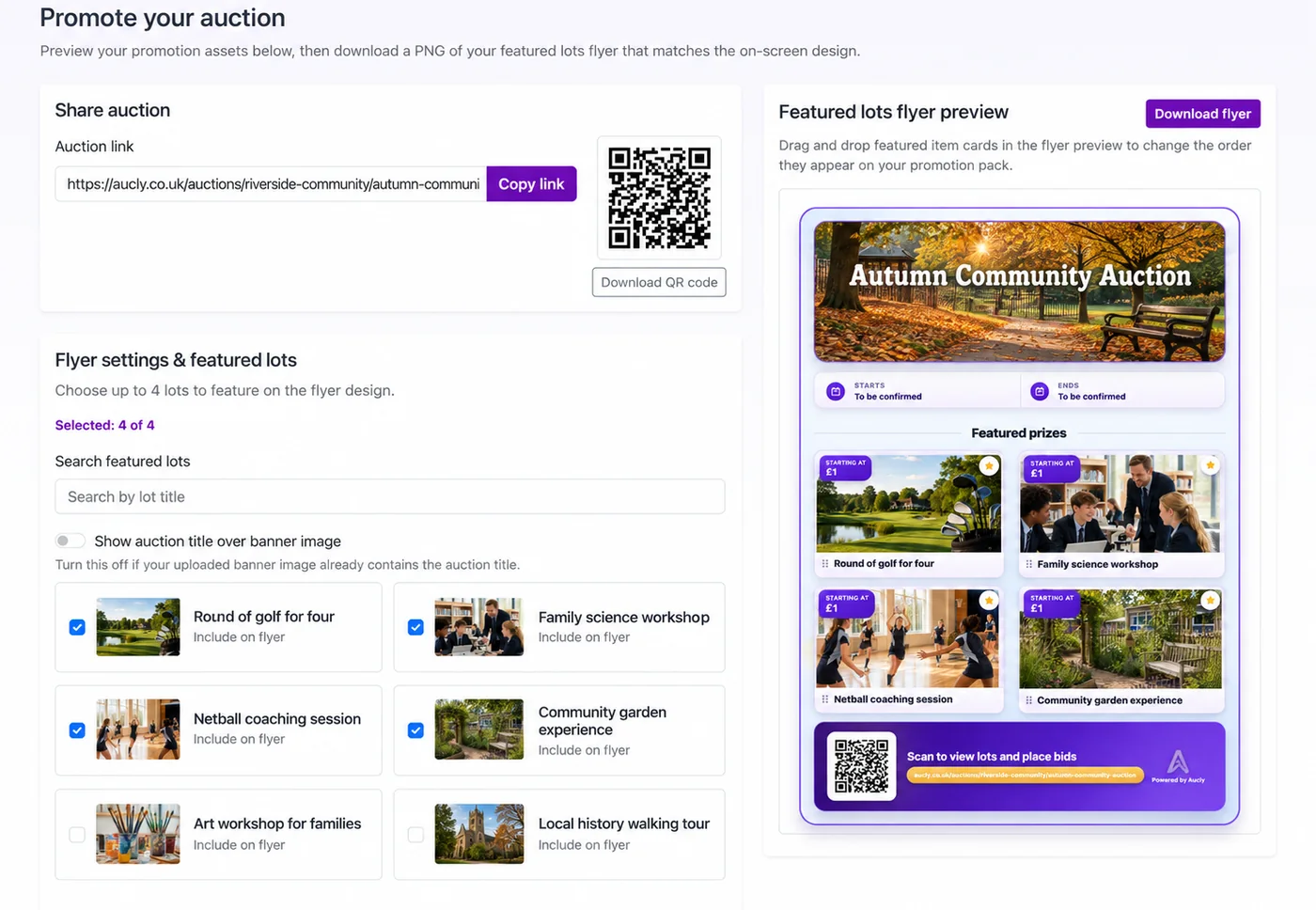
Share the auction link through channels your supporters already use: email, WhatsApp, social media, school or community apps, your organisation's website, printed posters, venue screens and QR codes. Alongside the main link, feature specific lots and explain the cause, the deadline and who can take part.
Our charity auction is open. We are raising money for [cause], with prizes including [examples]. You can browse and bid here: [auction link]. Bidding closes at [time] on [date]. You do not need to attend [event] to take part. Thank you for supporting us.
Plan more than one reminder: announce the launch, share a mid-auction update and send a final-day message. At a live event, coordinate with the host and place QR codes where guests have time to use their phones. Include a readable web address too, and test the link and mobile experience before the event.
7. Keep mobile bidding simple
Test the auction on a phone before launch: can a supporter register, find a lot, understand the current price, place a bid and return to an item they are watching? Check mobile reception or guest Wi-Fi where people will actually gather. Do not promise that online bidding works offline, and do not run parallel paper bids for the same lots unless you have a clear process for reconciling them.
8. Close clearly, then collect payment
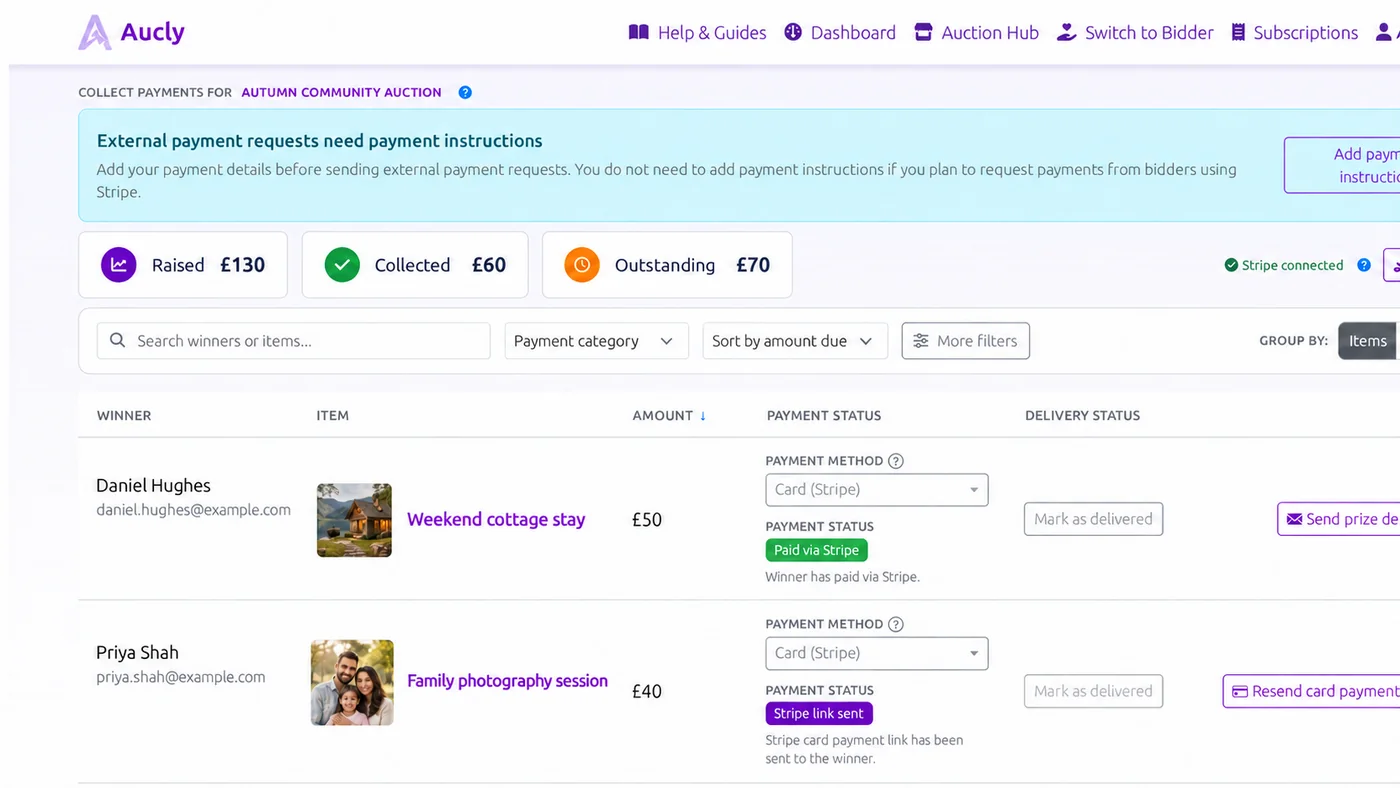
Before bidding begins, decide how winners will be notified, what payment options you will accept, who will follow up and how outstanding amounts will be tracked. When bidding closes, winners should be able to see what they have won and what to do next; organisers should have a clear record of winning bids and payment status.
Providers use different commercial models, such as organiser fees, transaction fees or optional supporter contributions. Compare the whole organiser and bidder experience, including payment processing charges where relevant, rather than treating the lowest headline platform price as the only measure of fit.
9. Fulfil the prizes and finish well
Track whether each winner has paid and whether their prize has been collected, delivered or emailed. Keep voucher codes and special instructions with the relevant lot, thank donors as agreed, and report confirmed proceeds accurately. For a large event, assign people to payment queries and prize handover so neither task is left to one volunteer.
The auction is not finished when the bids close. A simple fulfilment checklist helps ensure that winning bidders receive what they expected and that donor commitments are honoured.
Common mistakes to avoid
- Collecting lots without checking their restrictions, expiry dates or fulfilment arrangements.
- Using unclear descriptions or poor images for otherwise attractive prizes.
- Launching without a realistic promotion plan or a clearly repeated closing time.
- Making mobile bidding difficult, especially at an event where guests are using their phones.
- Accepting parallel paper and online bids without an agreed source of truth.
- Treating payment collection and prize fulfilment as work that can wait until after the auction.
Choosing a platform for your silent auction
A school fundraiser may prioritise quick setup and a manageable volunteer workload. A larger charity gala may place more weight on mobile bidding, a large catalogue and efficient winner and payment follow-up. In either case, auction software should support the work around the bids as well as the bidding itself.
Aucly is specialist fundraising-auction software for organisations that want to prepare and present lots, promote an auction, take online bids and manage the post-auction steps in one place. Explore the fundraising event auction workflow, read the charity golf-day guide, or check current pricing to see whether it suits your fundraiser.
A final checklist
Strong silent auctions combine desirable prizes, clear listings, straightforward mobile bidding, timely promotion, an understandable close and a plan for payments and fulfilment. Keep the format realistic for the people and time you have, whether the auction is a community fundraiser or part of a larger charity event.
If you are planning a fundraising auction, start preparing your auction and use the Aucly organiser and bidder overview to review the workflow.